Exact delivery time
At the top of the screen, select the set of transports for which you want to set delivery times. You can set the transport set in Settings -> Delivery and Payment

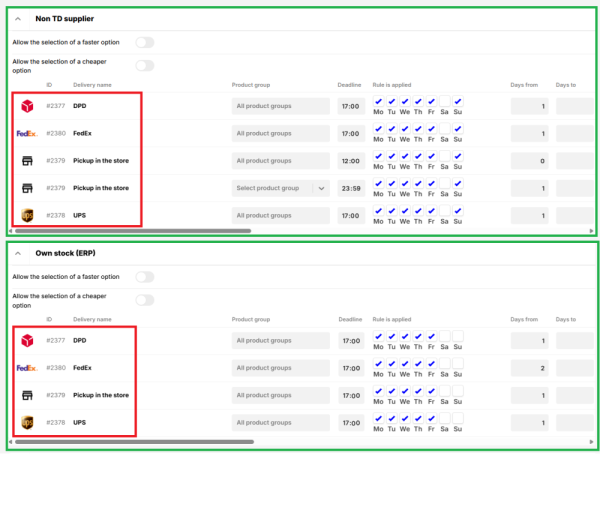
The delivery times for each type of transport (red) are set separately for each supplier (green). Each line represents one type of transport. For each type of transport it is possible to set how long it will take to deliver the product of a given supplier under different conditions.
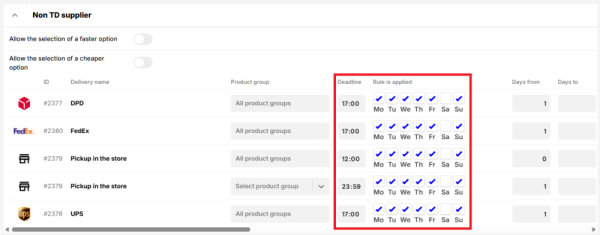
The following two columns are used to specify the time at which the later set delivery time will be displayed to customers on the site. In other words, when the customer must complete the order for the set delivery time to be valid for them.
Deadline
In this column, you set when the order must be completed by. So, for example, if you specify 17:00, as in the example above, the set delivery time will be valid on the site visible between 0:00 - 17:00. From 17:01 onwards, the same delivery time will be displayed as the next day. Typically, you will fill in the time by which you are able to process the created order on that day.
Rule is applied
Here you can check which days the rule applies to. Thus, you tick the days on which you are able to dispatch the goods.
In the remaining columns, you set the delivery time you want to show the customer on the website - when the ordered product will be delivered by the given type of transport.
"Days from" and "Days to"
In these two columns, you set the range of how many days you are able to ship the goods. So, for example, if you are able to ship the goods on a given day, the value in the “Days from” column will be 0. If the following day, the column will contain the value 1, etc.
The "Days to" column is not mandatory to fill in. It is used to allow you to display a time range for the delivery time.
Date displaying, Time and "Time From"/"Time To"
In the "Display Date" column you can choose whether you want to display the delivery time in the format of number of days or date.
Time means the time of delivery/shipment. It is possible to set the time range to a fixed time or use the predefined formulas “Morning”, “Afternoon”, ‘Evening’ or “Immediately”. If you choose a time span, then set it in the “Time from” and “Time to” columns.
Rule type
Here you can choose whether the displayed time data represents the time of delivery or the time of dispatch.