The e-shop allows you to implement multiple languages, currencies and domains. The options are as follows:
1. Another language of the e-shop
- All static elements of the e-shop are translated by us.
- In the e-shop administration, it is then possible to translate the names and texts of products, articles, categories, news. On the detail of the product / article / ... it is then possible to add translations into available languages.
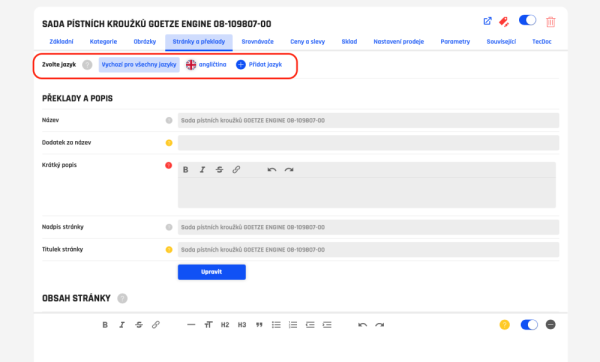
Current names and labels (in Czech) are taken as default and are displayed even after switching to another language. You are not forced to have 100% translated everything from the beginning, but you can add translations (sk, en, etc.) gradually.
The e-shop is then fully localized except for data from the TecDoc catalog, which are TecDoc categories, product names, parameters, vehicles.
TecDoc localization
- If you also order a localized license to these languages from TecAlliance, it will be possible to use additional languages on TecDoc at the same time. As soon as you switch the language on the e-shop, the language of the TecDoc data also switches.
- This means that the names of products, categories, vehicles and parameters from TecDoc will also be for customers in the currently selected language of the e-shop.
2. Another currency
- It is possible to implement a currency switcher, which can be used to switch between selected currencies. To change the currency, switch to the button.
3. Another domain
- The e-shop can also be operated on multiple domains at once, where different languages and currencies can be set on each domain. For example:
- kvikshop.cz - only Czech and CZK
- kvikshop.sk - Slovak and EUR
- kvikshop.com - English and German, currency EUR
- In the currency / language switcher, only the allowed languages / currencies will be available on each domain, and the switcher will then include a domain switcher.
Due to the fact that every additional language, currency, domain increases the demands on the operation of the e-shop, these are paid modules. Information on prices can be found in the e-shop administration - Modules.
How can I set different VAT rate for different countries?
You can specify different VAT rates (standard/reduced) for different countries in admin Settings -> Orders, VAT, Documents