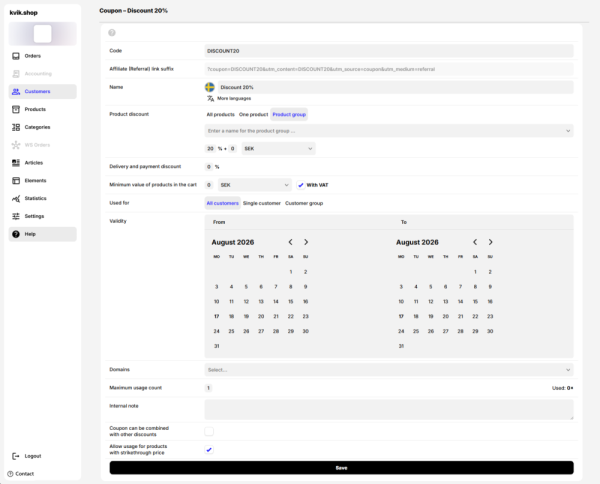
Coupons
Customers and users- You can create discount coupons in the administration panel under the Customers → Coupons section.
- When applied, the discount coupon is also recorded directly into the specific order.
1. Basic Identification
- Code – a unique text string (e.g., SLEVA20) that the customer enters in the cart to apply the discount. The code serves as the primary identifier of the coupon in the system.
- Affiliate (referral) link suffix – generated automatically. It is used for marketing purposes, tracking conversions, or by affiliate partners to distinguish traffic sources.
- Name – a custom name for the coupon to facilitate easier navigation in the administration. It supports localization into other languages via the integrated translation icon.
2. Discount Configuration
- Product discount – defines the discount amount and what it applies to:
- Scope: All products, One specific product, or an entire Product group.
- Discount type: Percentage (%), a fixed amount in currency (e.g., CZK), or both simultaneously.
- Shipping and payment discount – a percentage discount value applicable to shipping and payment fees in the cart.
- If set to 0%, delivery costs are not reduced.
- Conversely, a 100% discount can serve as Free Shipping.
- Minimum product value in cart – a condition determining the cart value (e.g., in CZK) required to activate the coupon. You can check whether this minimum amount should be assessed including VAT or excluding tax.
3. Validity and Target Audience
- Intended for – restricts the discount to a specific target audience.
- Options include: All customers, A specific customer, or a Customer group (e.g., B2B, registered).
- Validity (From – To) – sets the validity period of the coupon. It features two interactive calendars to define the start and end dates during which the code is active.
- Domains – in e-shops with multiple entities or language mutations, this allows selecting the domains where this specific discount coupon is valid.
4. Limits and Additional Rules
- Maximum number of uses – limits how many times the coupon can be applied in total by all customers (e.g., 1 = a coupon for the first buyer). The interface also displays current usage statistics (Used: 0x).
- Internal note – space for the e-shop administrator to leave a text note (e.g., the purpose of creating the discount). The customer does not see this note.
- Discount combinability – determines whether this coupon can be applied even if other discount codes or promotions are already used in the cart.
- Products with a crossed-out price – a checkbox that, when activated, allows the customer to use this discount coupon even on products that are already discounted (i.e., they have a crossed-out price on the e-shop). Otherwise, the code can only be applied to non-discounted goods.
Important: All changes are applied and saved to the system only after clicking the prominent black Save button located at the bottom of the form.