E-mail quota (limit)
In case you have set up mailhosting on kvik.shop servers, the limit of e-mail boxes is limited to 2 GB/mailbox. If this email quota is exceeded, the situation can be solved with one of three options.
- Purge old email messages, which will reduce the overall space usage.
- Increase the e-mail box quota (for a fee).
- Migrate the mailbox to another mail hosting provider with a higher quota.
1. Deleting your mailbox of unwanted emails is the easiest option however it requires regular monitoring on your part.
2. It is possible to increase the mailbox quota by another 2 GB (price according to the price list in the e-shop administration). If you are interested in the increase, please contact us at info@kvik.shop.
3. The most conceptual solution is to migrate the mailbox to a specialized mail hosting provider. kvik.shop is not specialized in mail hosting services. Mail hosting can usually be set up with a domain registrar. Another option is to use services like Google Workspace, which also includes Google drive, Docs, Sheets, etc.
Archivation of messages
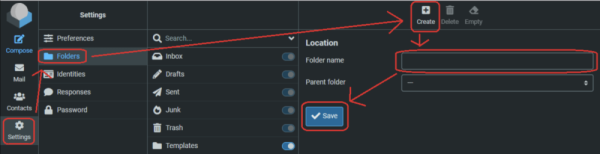
To speed up your web browser mailbox access and simplify the deletion of old message, we recommend using the archivation feature. To make it work follow these steps:
Create a folder for archiving
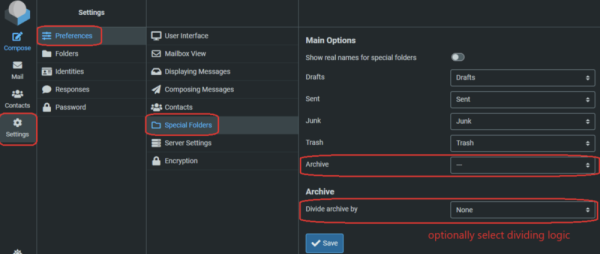
2. Chose that folder as archiving folder, choose archiving strategy
It is recommended to choose Month strategy.
3. Archive mails from the Inbox
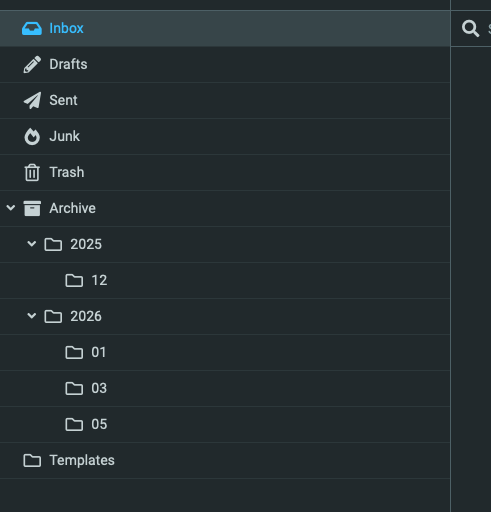
Select emails for archiving and after clicking "Archive", the emails will be moved from your inbox to the appropriate archive subdirectory.

After these steps, you can easily browse through the mail archive and delete messages from archived month. Less messages in the main Inbox folder also improves the response time.