Technical specification of Google Analytics implementation on a kvik.shop shop
There are 3 options on how you can deploy Google Analytics scripts.
1. Gtag.js integrated script
- The gtag.js script is integrated in the shop system.
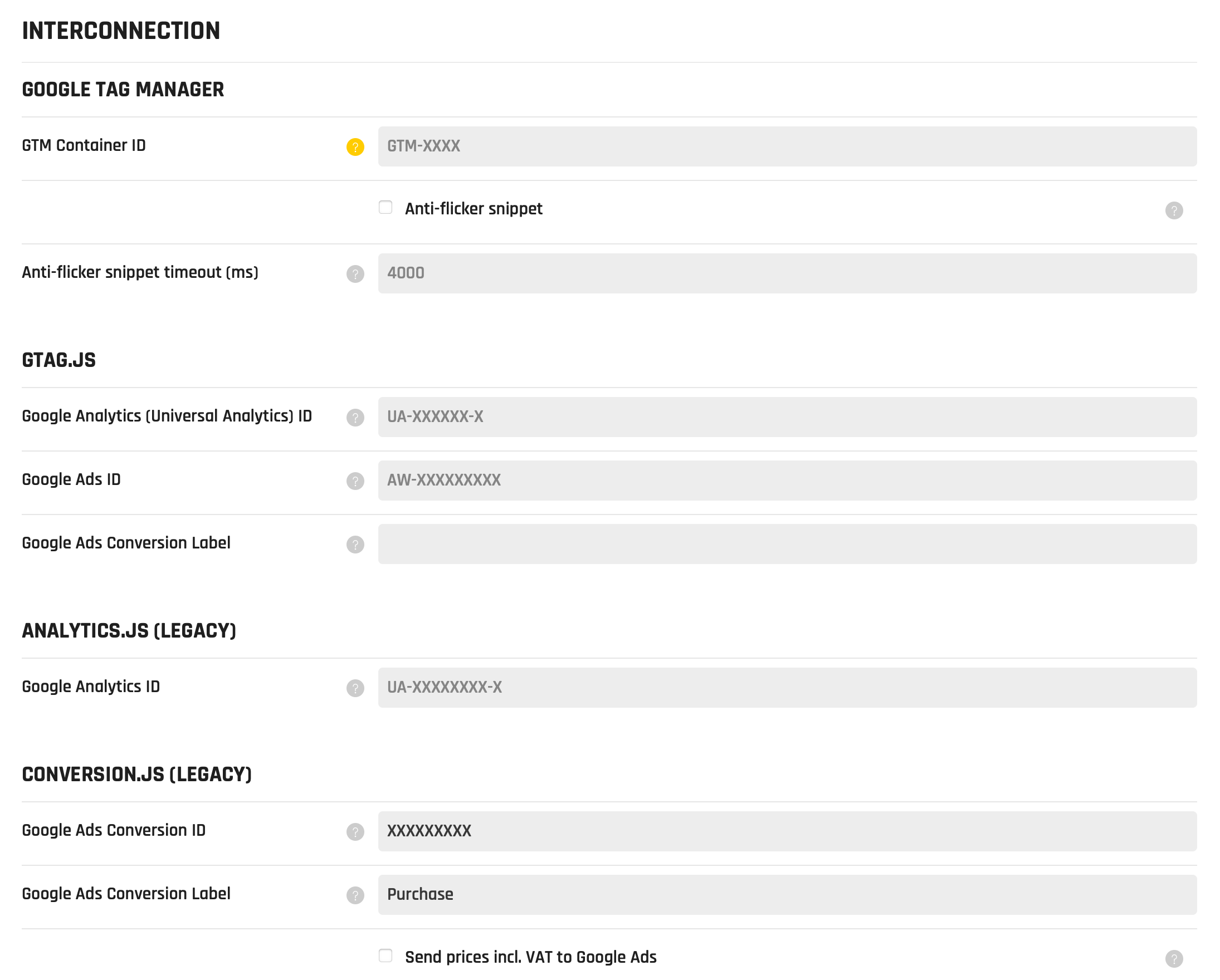
- You have just to fill in the Google Analytics Tracking ID (UA-XXXXX-X) and/or Google Ads ID (AW-XXXXXX) in the shop's Admin ▸ Settings.
- This solution is the easiest and most feature rich way.
2. Via Google Tag Manager
- Google Analytics and G-Ads scripts deployed via Google Tag Manager.
- The underlying Google Tag Manager script is integrated in the shop system.
- You have just to fill in the GTM Container ID in the shop's Admin ▸ Settings.
- This solution is good for more experienced users who can benefit from the freedom and possibilities that GTM brings.
- The Google Analytics script is NOT automatically inserted in the shop. You have to properly insert it in the GTM user interface on tagmanager.google.com.
- There are available almost all the key Enhanced Ecommerce data in the GTM dataLayer, so you can use it for GA if you configure it properly in GTM user interface.
3. Integrated legacy analytics.js and conversion.js scripts
- These legacy scripts are integrated in the shop system but not available for new clients.
- You have just to fill in the Google Analytics Tracking ID (UA-XXXXX-X) and/or Google Ads ID in the shop's Admin ▸ Settings.
- There is available transaction tracking only.
Comparison of the options
| Implemented features | 1. gtag.js | 2. Via GTM | 3. Legacy |
|---|---|---|---|
| Easy Setup | Yes | No | Yes |
| Google Analytics | Yes | Yes | Yes |
| G-Ads | Yes | Yes | Yes |
| Multiple GA and G-Ads IDs possibility | Yes | Yes | Yes |
| Transaction tracking | Yes | Yes | Yes |
| Data Layer | Yes | Yes | No |
| Enhanced E-commerce events | Yes | Yes | No |
| Enhanced Conversion Data for G-Ads | Yes | Unknown | No |
| Universal Analytics support (UA-XXXXXX) | Yes | Yes | Yes |
| GA4 support (G-XXXXXX) | Yes | Yes | No |
| Consent Mode | Yes | Yes | No |
| Interconnected with Cookie Consent Manager module | Yes | Yes | No |
Screenshot of the Admin Settings
Google Analytics Transaction Tracking
- Value total contains total amount excluding shipping cost and tax.
- Value shipping contains summed delivery and payment costs excluding tax.
- Value tax contains VAT (Value Added Tax) summed of all order items (products, delivery, payment, …).
Google Analytics Product detail
- Dimension 1 contains the product ID.
- Dimension 2 contains value 'product'.