Send an Email (and SMS) Related to an Order
- You can send an email to the contact email address of an order.
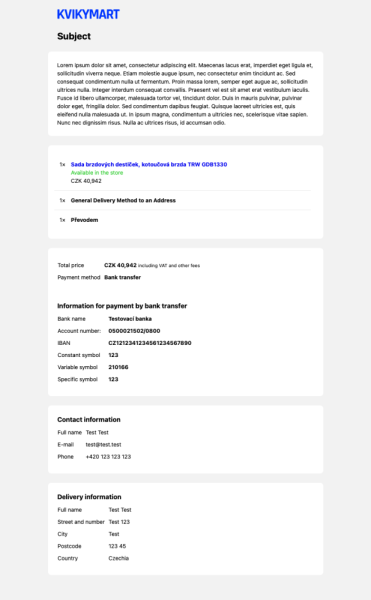
- The message will be sent in the unified email layout used by the platform. See the email layout below.
- It is also possible to send the message as an SMS. The SMS will be sent the contact phone number of the order.
- For sending SMS, it is needed to have the SMS module enabled in the shop.
POST /api/app/message/order
Request
POST /api/app/message/order HTTP/1.1
Host: yourshopname.com
Authorization: Bearer ACCESS_TOKEN_STRING
Accept-Encoding: gzip
Content-Type: application/json

{
    "_type": "OrderMessage",
    "orderCode: "1234",
    "subject": 'Example Subject',
    "body": '<strong>Example text</strong>',
    "sendSms": true,
    "attachements": [{
        "_type": "FileContent",
        "fileType": "application/pdf"
        "fileName": "invoice_123.pdf"
        "base64Content": "...."
    }]
}
Response
HTTP/1.1 200 OK
Content-Encoding: br
OrderMessage Type
orderCode: stringsubject: stringbody: stringThe HTML content of the message. It has to contain only basic tags like headings, strong, italics, paragraphs. It has not to contain the whole layout of the message since it will be inserted into the unified email layout.sendSmsIf you want to send the message via both email and SMS, set the value totrue. The SMS text will strip all HTML tags from thebodyvalue.attachments: FileContent[]
FileContent Type
fileType: stringCommonly known also as Content-Type or MimeType. List of types.fileName: stringbase64Content: stringContent of the file encoded as Base64 string.
Order Email Preview
This is how the email layout looks like.
- The
subjectis bellow the shop logo. - The
bodyis wrapped in the box. - Below the
bodybox, there is a recapitulation of the related order. - It always takes into account the actual state of the order. For example, if the order is already paid, there are no the payment details displayed.